
EdTech
EdTech
EdTech
EdTech
EdTech
English Prime
English Prime
English Prime
English Prime
English Prime
//
//
//
//
//
Client
Client
Client
Client
Client
Vyacheslav Chepyk
Vyacheslav Chepyk
Vyacheslav Chepyk
Vyacheslav Chepyk
//
//
//
//
//
Services
Services
Services
Services
Services
UX/UI / Branding
UX/UI / Branding
UX/UI / Branding
UX/UI / Branding
UX/UI / Branding
//
//
//
//
//
Year
Year
Year
Year
Year
( 2023 )
( 2023 )
( 2023 )
( 2023 )
( 2023 )
English Prime is a platform for managing the learning processes of students and teachers of one of the most famous English language schools in Ukraine.
The platform allows you to complete homework and exams, conduct online lessons, create groups and courses, libraries with learning materials, and much more
English Prime is a platform for managing the learning processes of students and teachers of one of the most famous English language schools in Ukraine.
The platform allows you to complete homework and exams, conduct online lessons, create groups and courses, libraries with learning materials, and much more
English Prime is a platform for managing the learning processes of students and teachers of one of the most famous English language schools in Ukraine.
The platform allows you to complete homework and exams, conduct online lessons, create groups and courses, libraries with learning materials, and much more
English Prime is a platform for managing the learning processes of students and teachers of one of the most famous English language schools in Ukraine.
The platform allows you to complete homework and exams, conduct online lessons, create groups and courses, libraries with learning materials, and much more

Challenge:
Challenge:
Challenge:
Challenge:
Challenge:
Creating not just a beautiful, but also a user-friendly product that fully covers all learning needs at different levels.
Create an interface for the student role that allows you to conveniently attend classes, complete homework and exams, and participate in online classes.
Create an interface for the role of the teacher that allows you to conveniently conduct classes with different groups, assign and check homework and exams, conduct online classes, and track general training statistics.
Create an interface for the administrator role that allows you to quickly and conveniently form teams of managers, recruiters, and teachers, as well as manage key activities such as creating courses, groups, lessons, training materials, and more.
Creating not just a beautiful, but also a user-friendly product that fully covers all learning needs at different levels.
Create an interface for the student role that allows you to conveniently attend classes, complete homework and exams, and participate in online classes.
Create an interface for the role of the teacher that allows you to conveniently conduct classes with different groups, assign and check homework and exams, conduct online classes, and track general training statistics.
Create an interface for the administrator role that allows you to quickly and conveniently form teams of managers, recruiters, and teachers, as well as manage key activities such as creating courses, groups, lessons, training materials, and more.
Creating not just a beautiful, but also a user-friendly product that fully covers all learning needs at different levels.
Create an interface for the student role that allows you to conveniently attend classes, complete homework and exams, and participate in online classes.
Create an interface for the role of the teacher that allows you to conveniently conduct classes with different groups, assign and check homework and exams, conduct online classes, and track general training statistics.
Create an interface for the administrator role that allows you to quickly and conveniently form teams of managers, recruiters, and teachers, as well as manage key activities such as creating courses, groups, lessons, training materials, and more.
Creating not just a beautiful, but also a user-friendly product that fully covers all learning needs at different levels.
Create an interface for the student role that allows you to conveniently attend classes, complete homework and exams, and participate in online classes.
Create an interface for the role of the teacher that allows you to conveniently conduct classes with different groups, assign and check homework and exams, conduct online classes, and track general training statistics.
Create an interface for the administrator role that allows you to quickly and conveniently form teams of managers, recruiters, and teachers, as well as manage key activities such as creating courses, groups, lessons, training materials, and more.
Creating not just a beautiful, but also a user-friendly product that fully covers all learning needs at different levels.
Create an interface for the student role that allows you to conveniently attend classes, complete homework and exams, and participate in online classes.
Create an interface for the role of the teacher that allows you to conveniently conduct classes with different groups, assign and check homework and exams, conduct online classes, and track general training statistics.
Create an interface for the administrator role that allows you to quickly and conveniently form teams of managers, recruiters, and teachers, as well as manage key activities such as creating courses, groups, lessons, training materials, and more.
Solution:
Solution:
Solution:
Solution:
Solution:
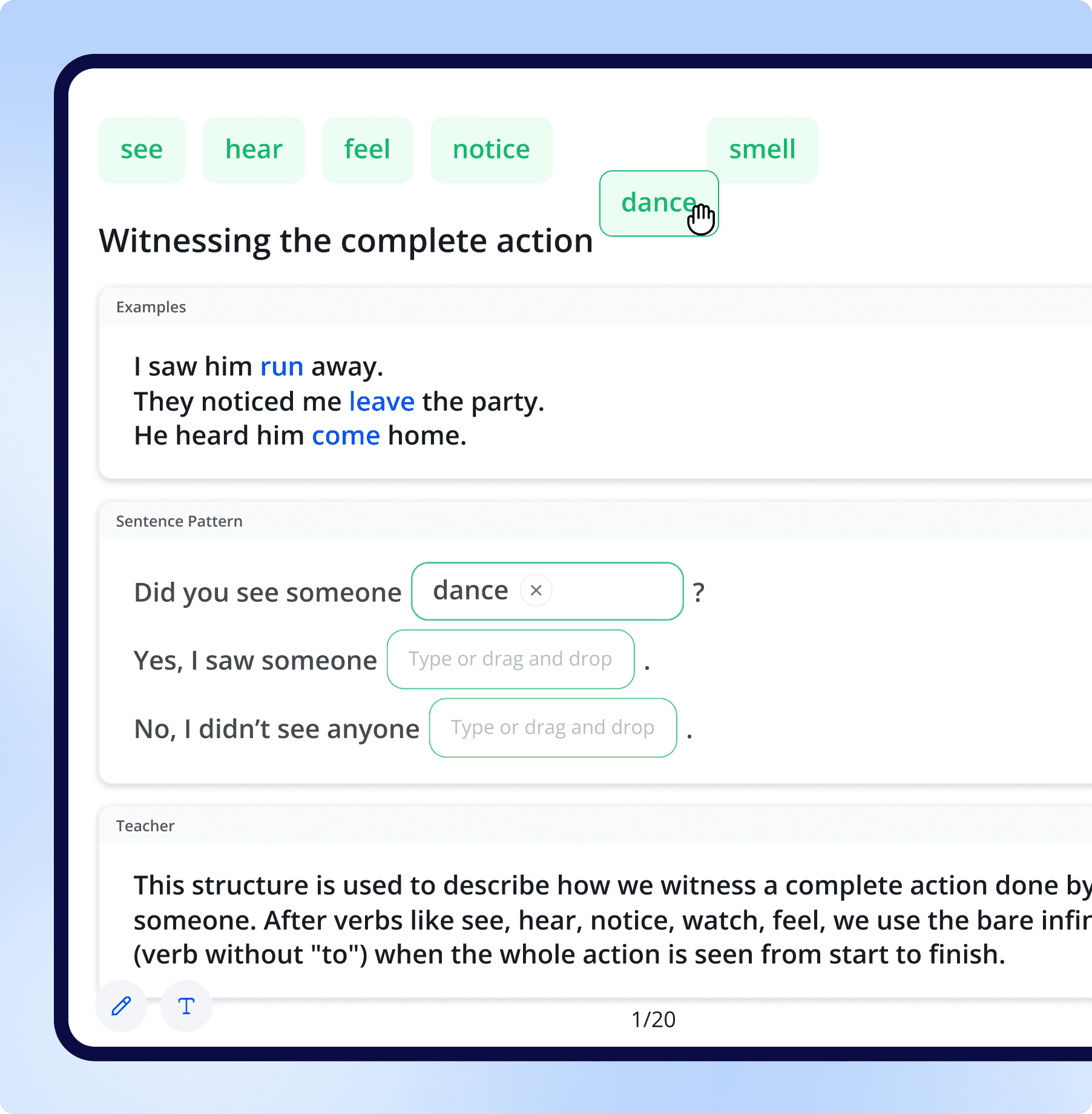
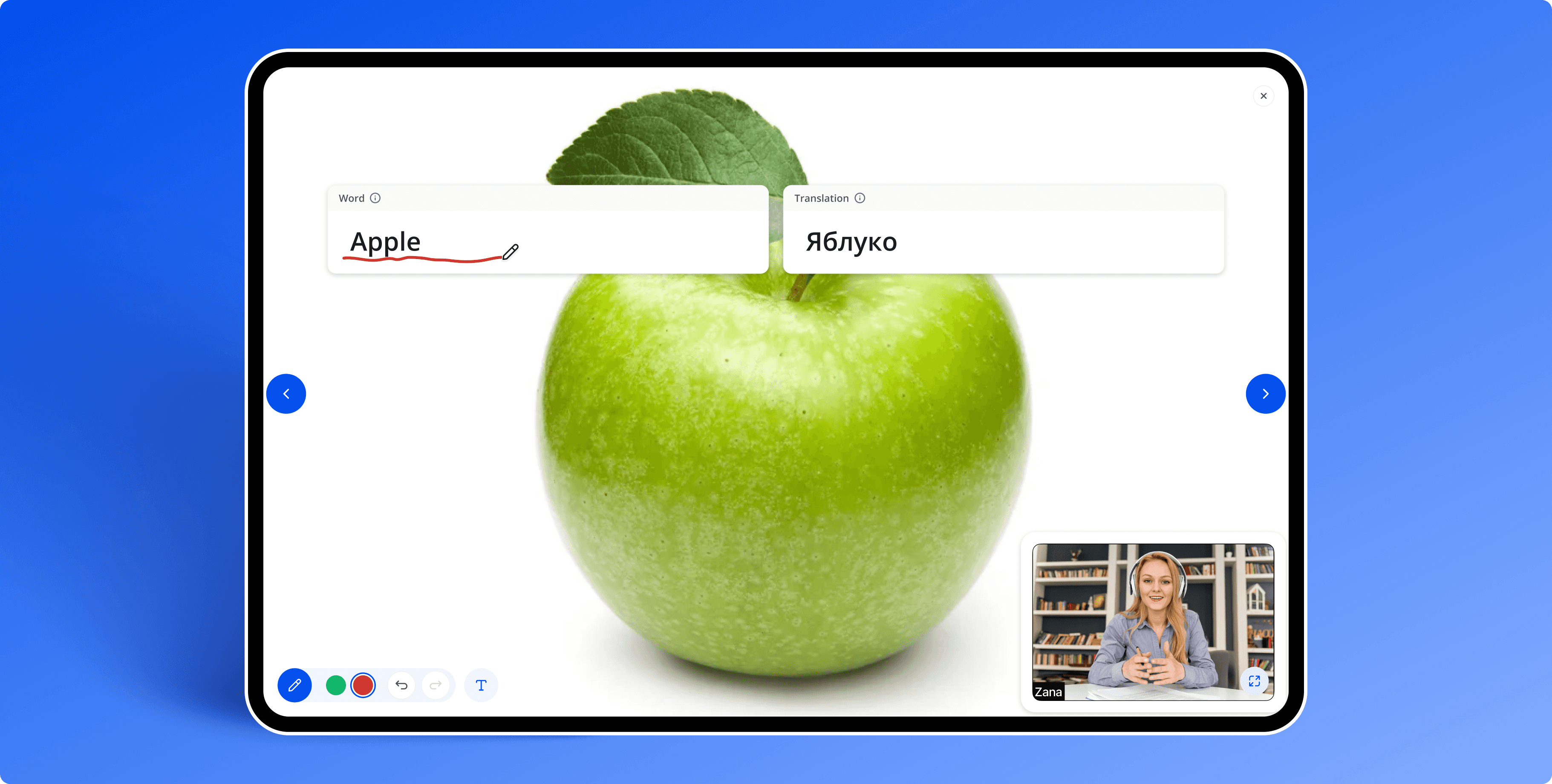
Convenient student interaction with learning materials
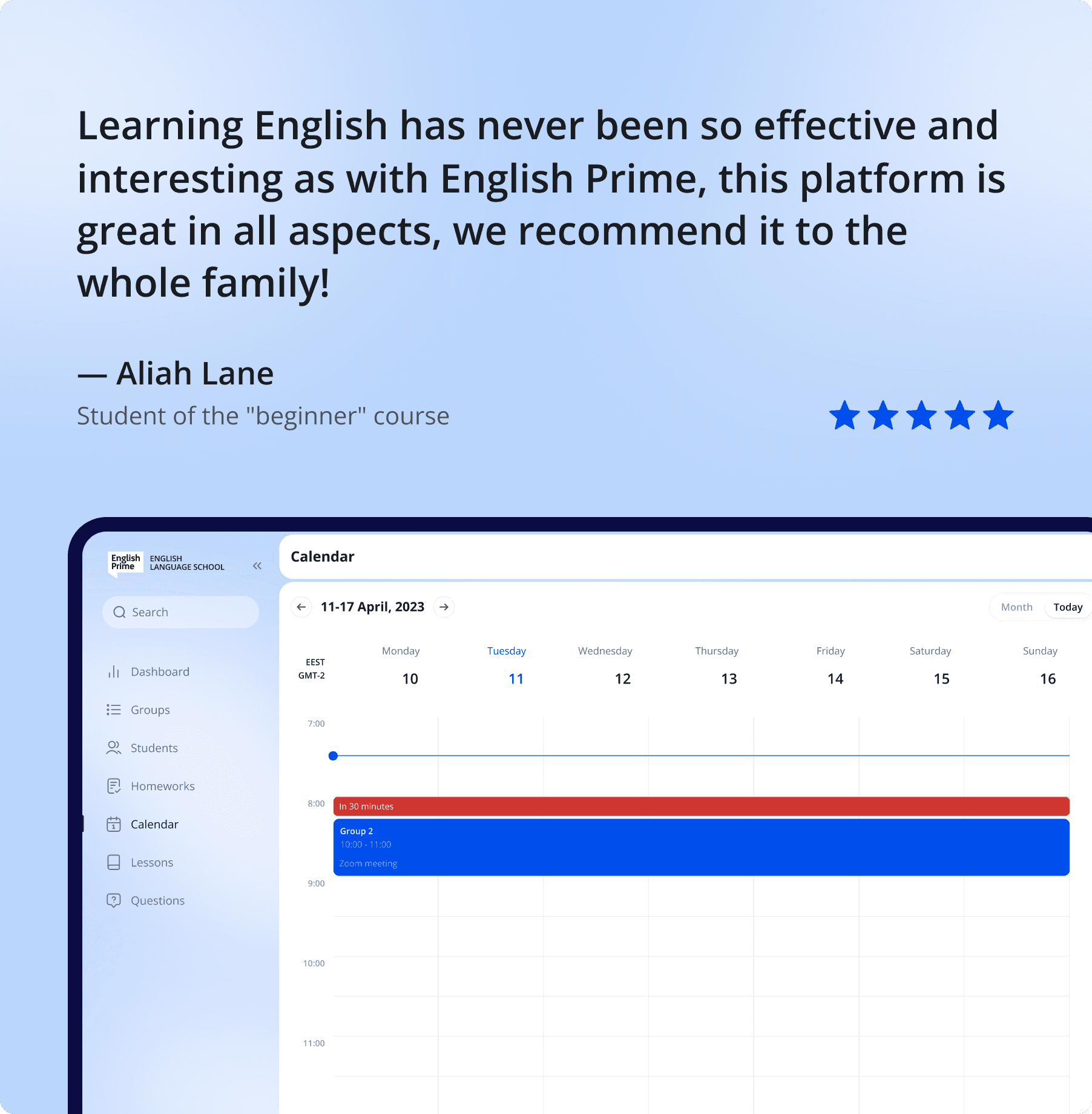
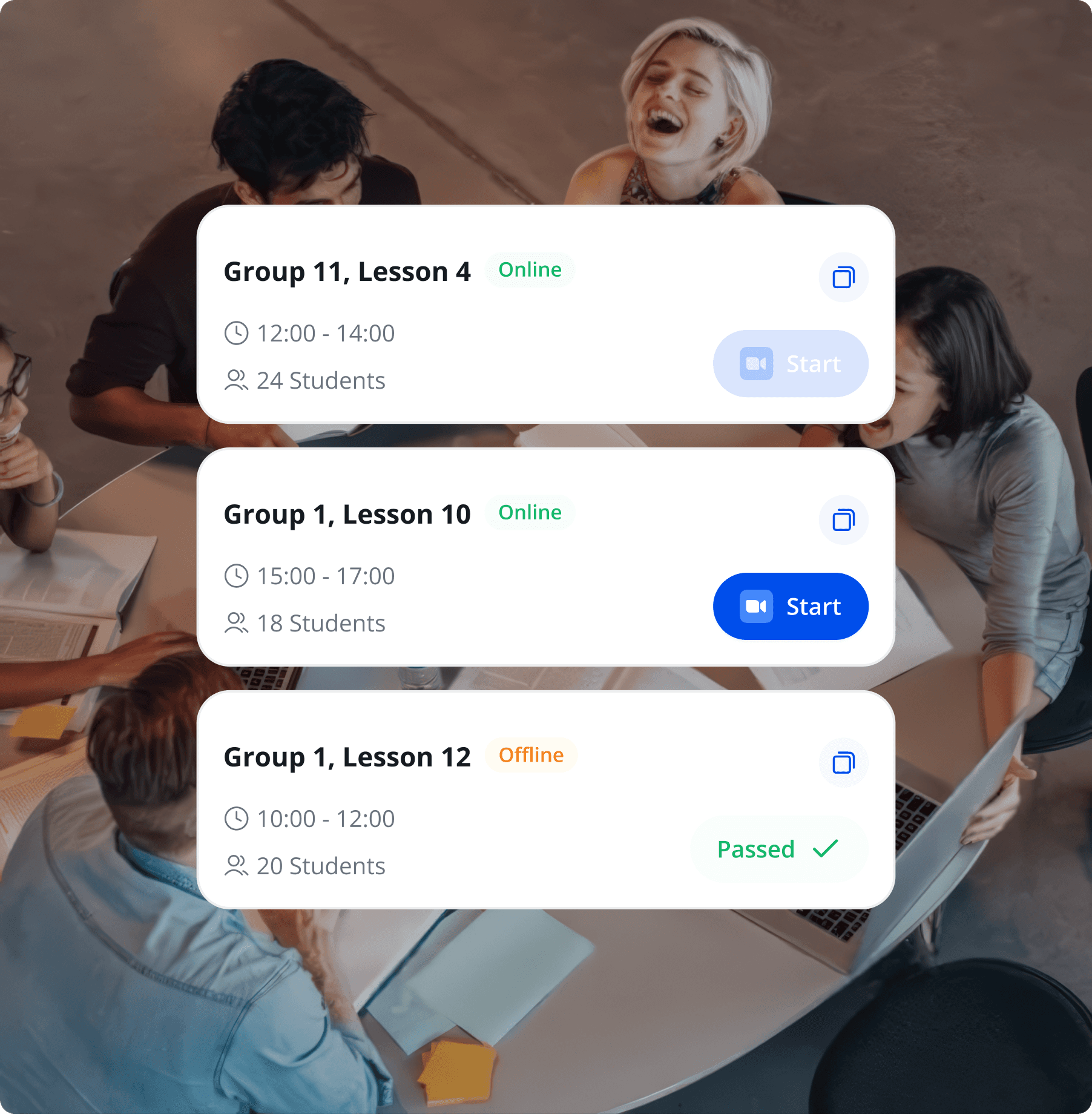
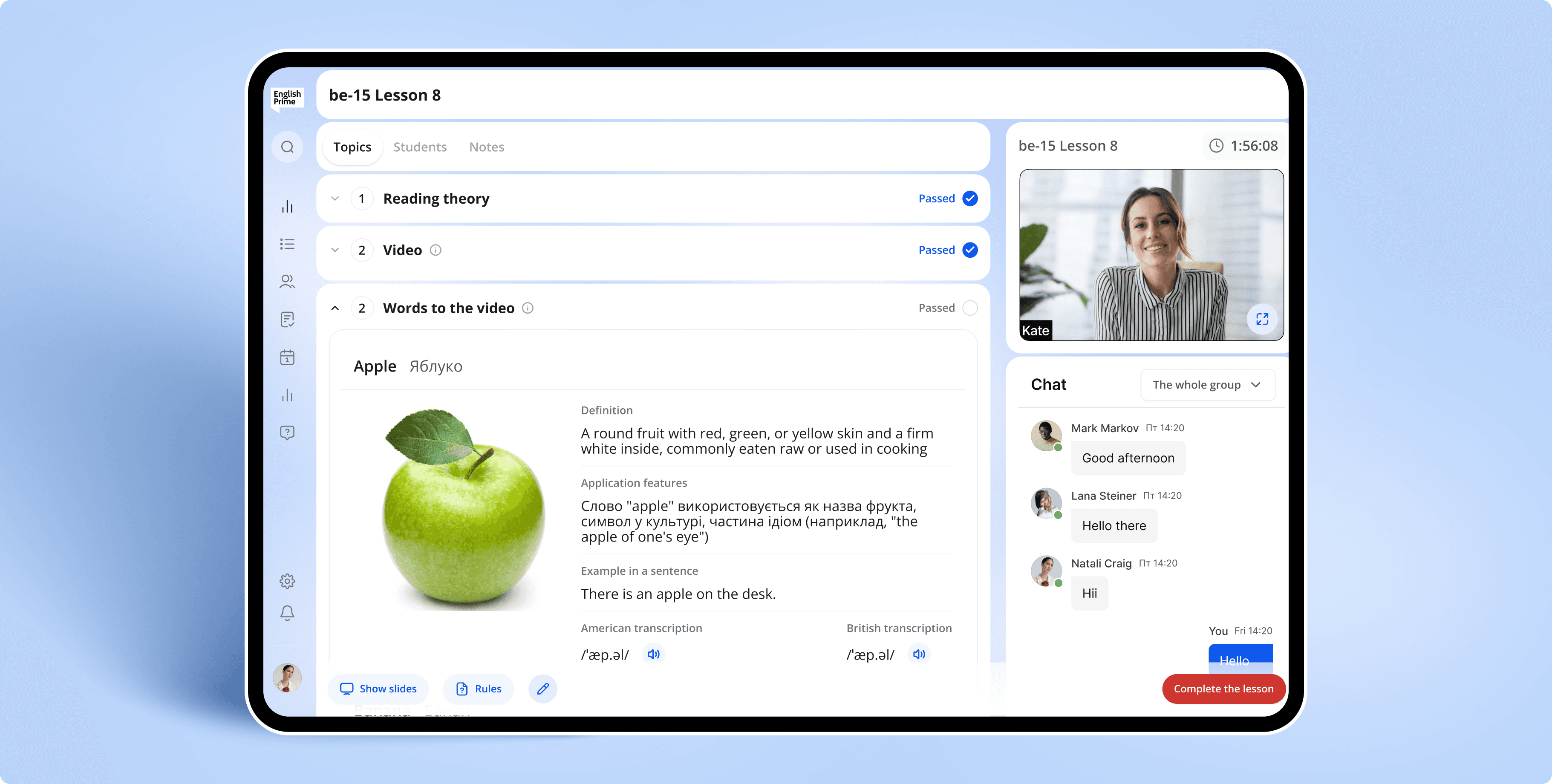
The interface allows students to attend online lessons where they practice vocabulary, idioms, words to videos, and Sentence Patterns. Classes are held in the format of a teacher-led presentation: students fill in the fields, say the words, and this makes learning easy and convenient. This is exactly what was emphasized when creating the platform.
Convenient student interaction with learning materials
The interface allows students to attend online lessons where they practice vocabulary, idioms, words to videos, and Sentence Patterns. Classes are held in the format of a teacher-led presentation: students fill in the fields, say the words, and this makes learning easy and convenient. This is exactly what was emphasized when creating the platform.
Convenient student interaction with learning materials
The interface allows students to attend online lessons where they practice vocabulary, idioms, words to videos, and Sentence Patterns. Classes are held in the format of a teacher-led presentation: students fill in the fields, say the words, and this makes learning easy and convenient. This is exactly what was emphasized when creating the platform.
Convenient student interaction with learning materials
The interface allows students to attend online lessons where they practice vocabulary, idioms, words to videos, and Sentence Patterns. Classes are held in the format of a teacher-led presentation: students fill in the fields, say the words, and this makes learning easy and convenient. This is exactly what was emphasized when creating the platform.
Solution:
Solution:
Solution:
Solution:
Solution:
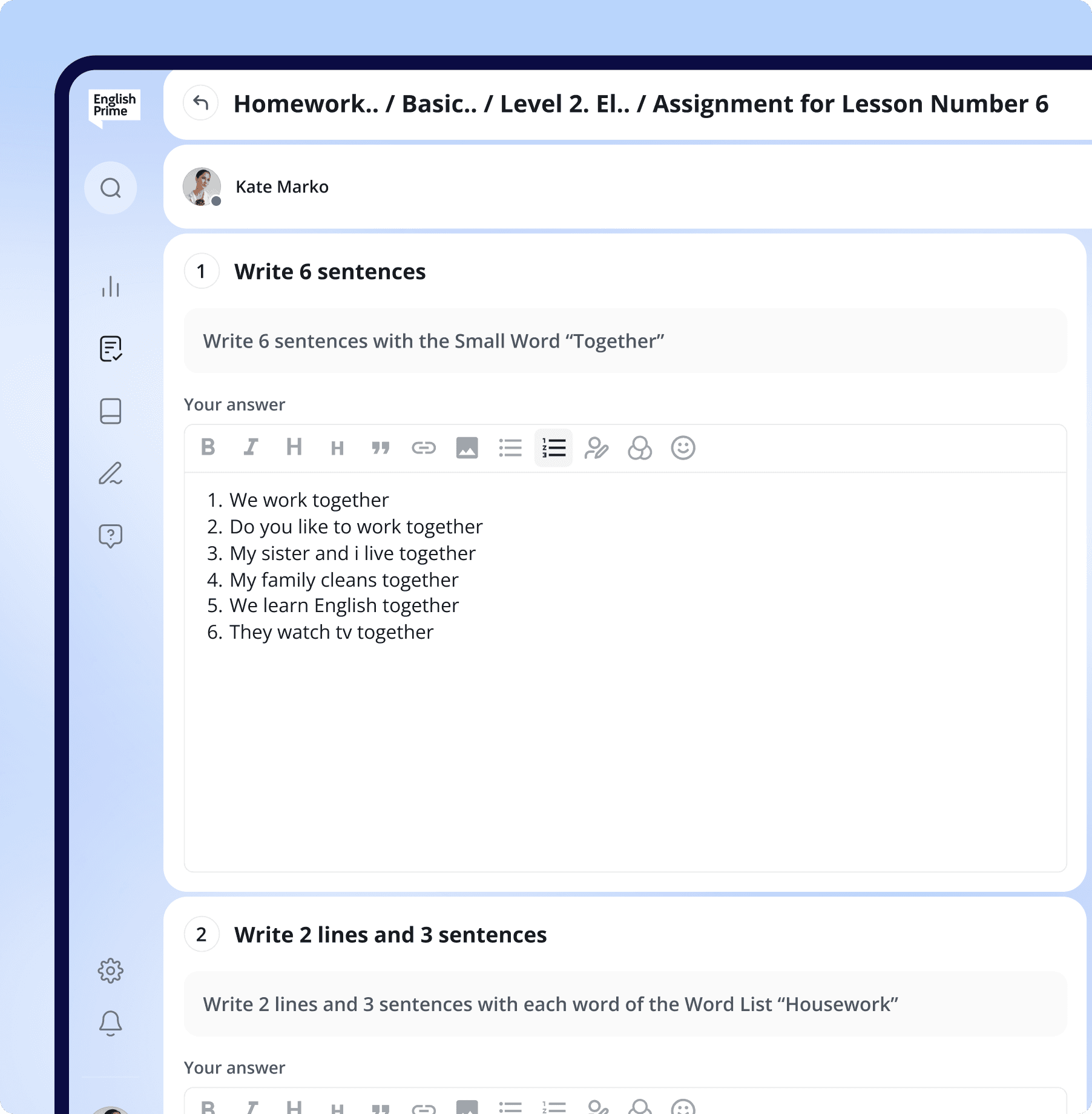
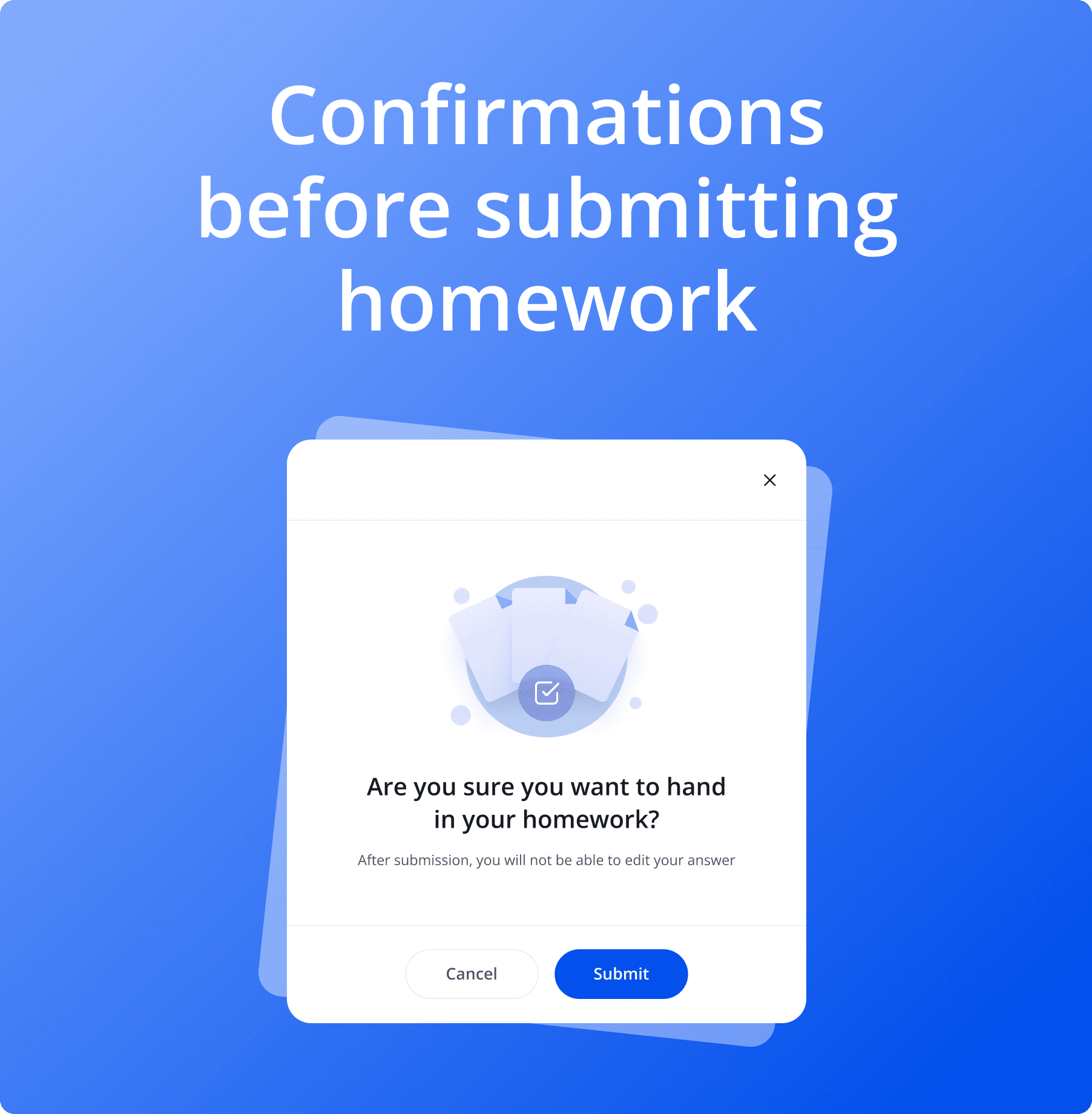
Completing homework has never been easier
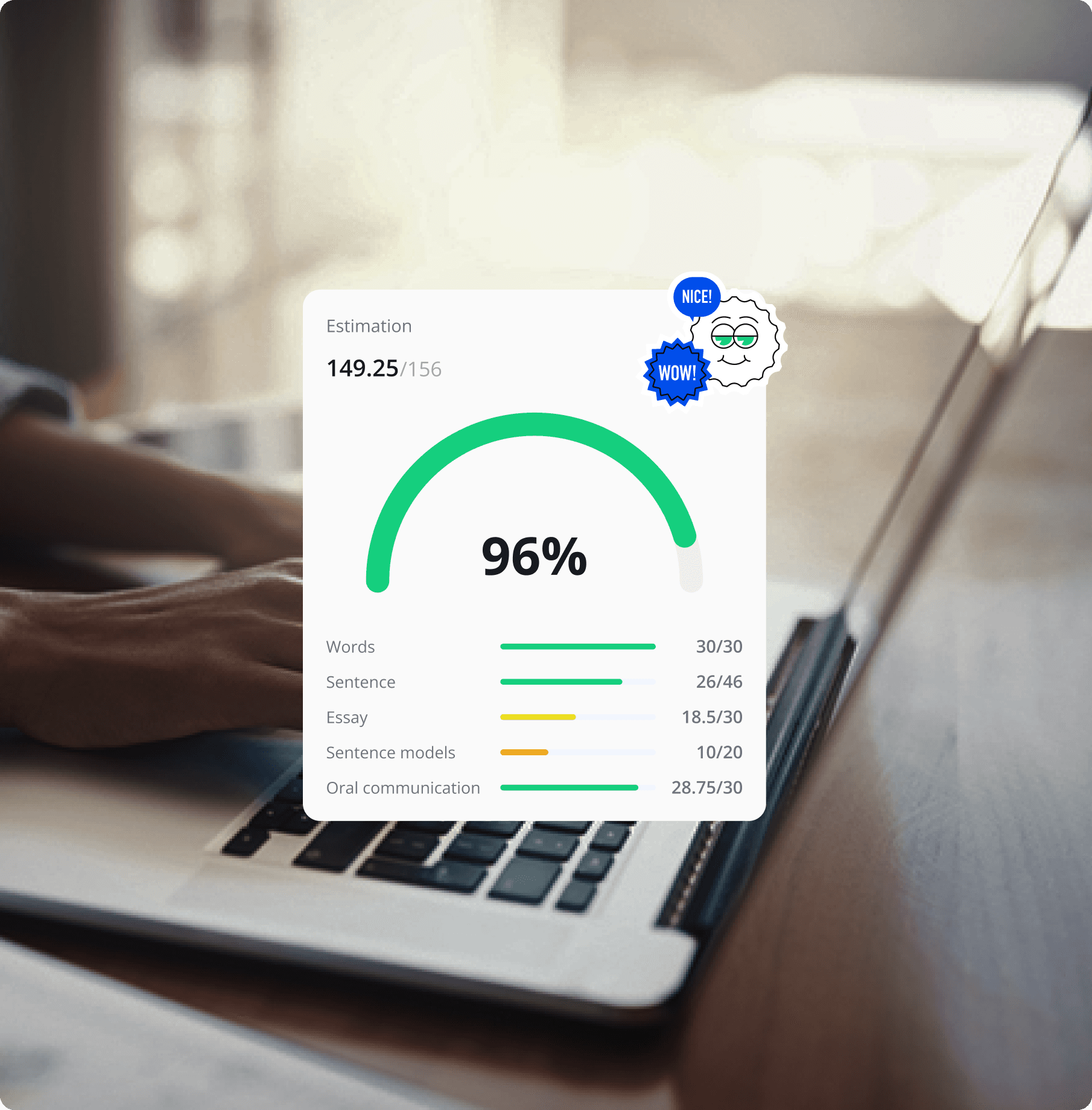
Students can track their progress on homework and view the results after the teacher checks them. The system also reminds students of the due date, which motivates them to complete their assignments more actively.
While working, students see clearly structured tasks and fields for entering answers. Everything is simple and convenient - nothing unnecessary that could distract from the process.
Completing homework has never been easier
Students can track their progress on homework and view the results after the teacher checks them. The system also reminds students of the due date, which motivates them to complete their assignments more actively.
While working, students see clearly structured tasks and fields for entering answers. Everything is simple and convenient - nothing unnecessary that could distract from the process.
Completing homework has never been easier
Students can track their progress on homework and view the results after the teacher checks them. The system also reminds students of the due date, which motivates them to complete their assignments more actively.
While working, students see clearly structured tasks and fields for entering answers. Everything is simple and convenient - nothing unnecessary that could distract from the process.
Completing homework has never been easier
Students can track their progress on homework and view the results after the teacher checks them. The system also reminds students of the due date, which motivates them to complete their assignments more actively.
While working, students see clearly structured tasks and fields for entering answers. Everything is simple and convenient - nothing unnecessary that could distract from the process.
Completing homework has never been easier
Students can track their progress on homework and view the results after the teacher checks them. The system also reminds students of the due date, which motivates them to complete their assignments more actively.
While working, students see clearly structured tasks and fields for entering answers. Everything is simple and convenient - nothing unnecessary that could distract from the process.
Solution
Solution
Solution
Solution
Solution
Conducting online lessons for groups of students
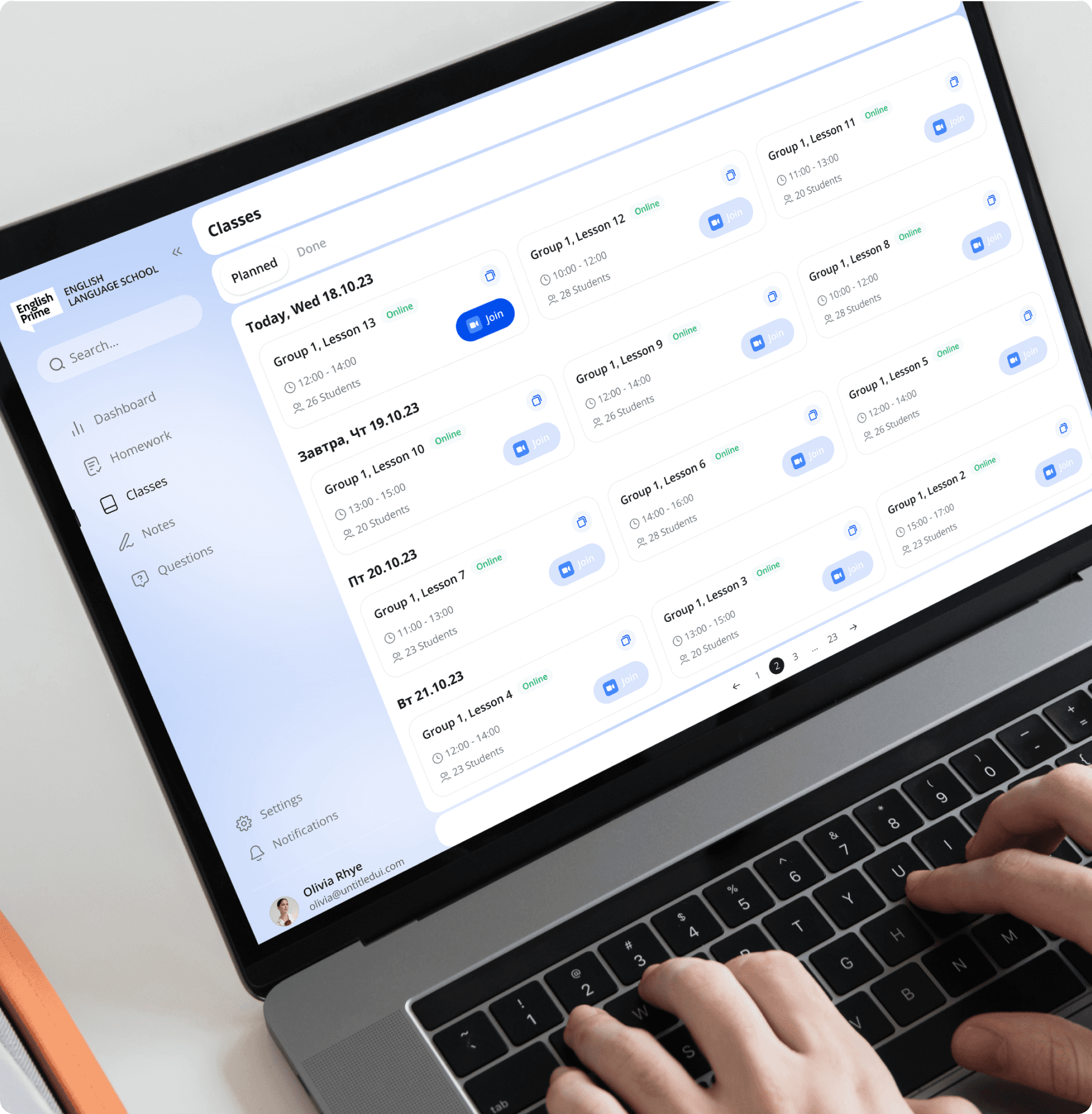
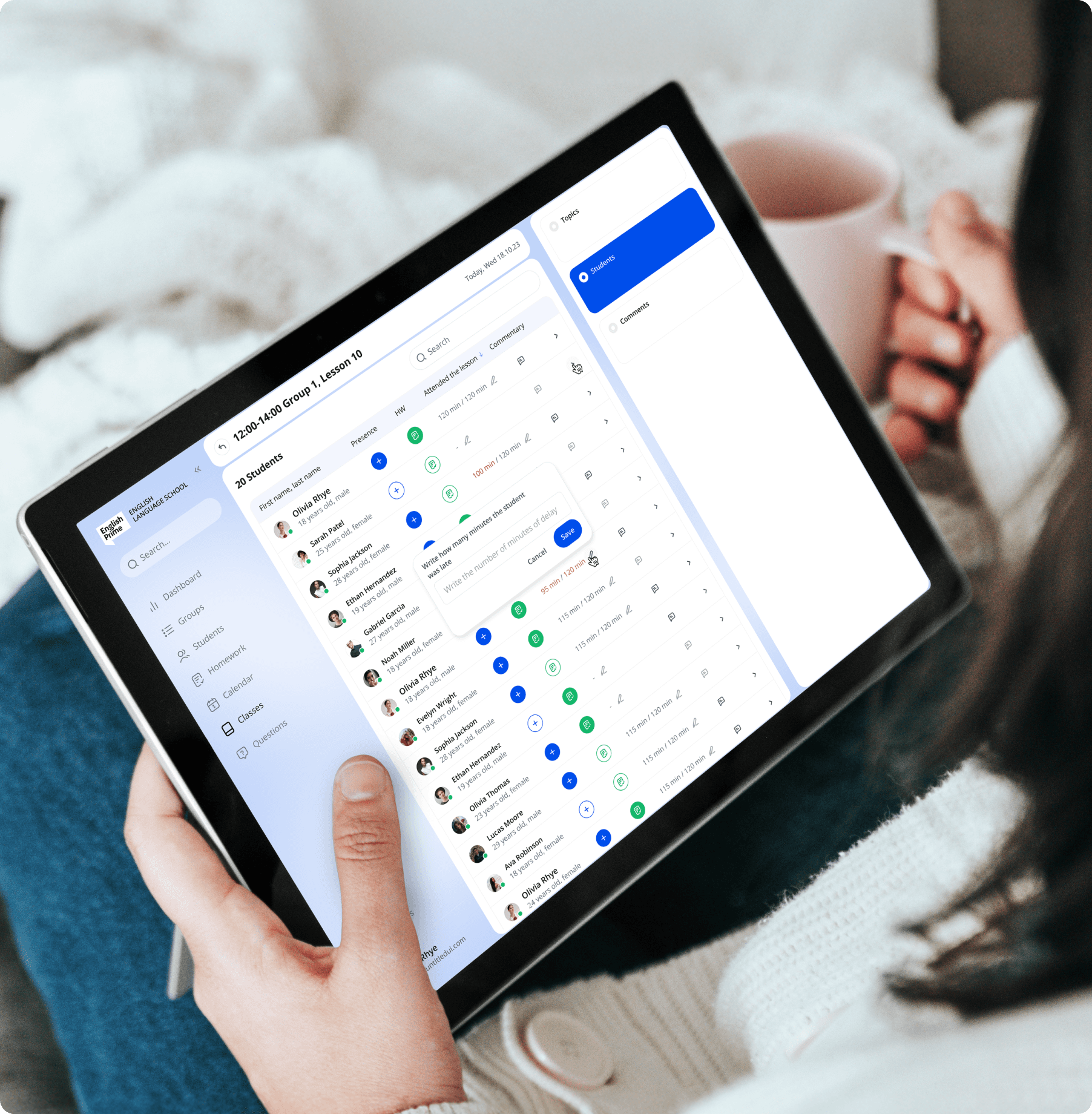
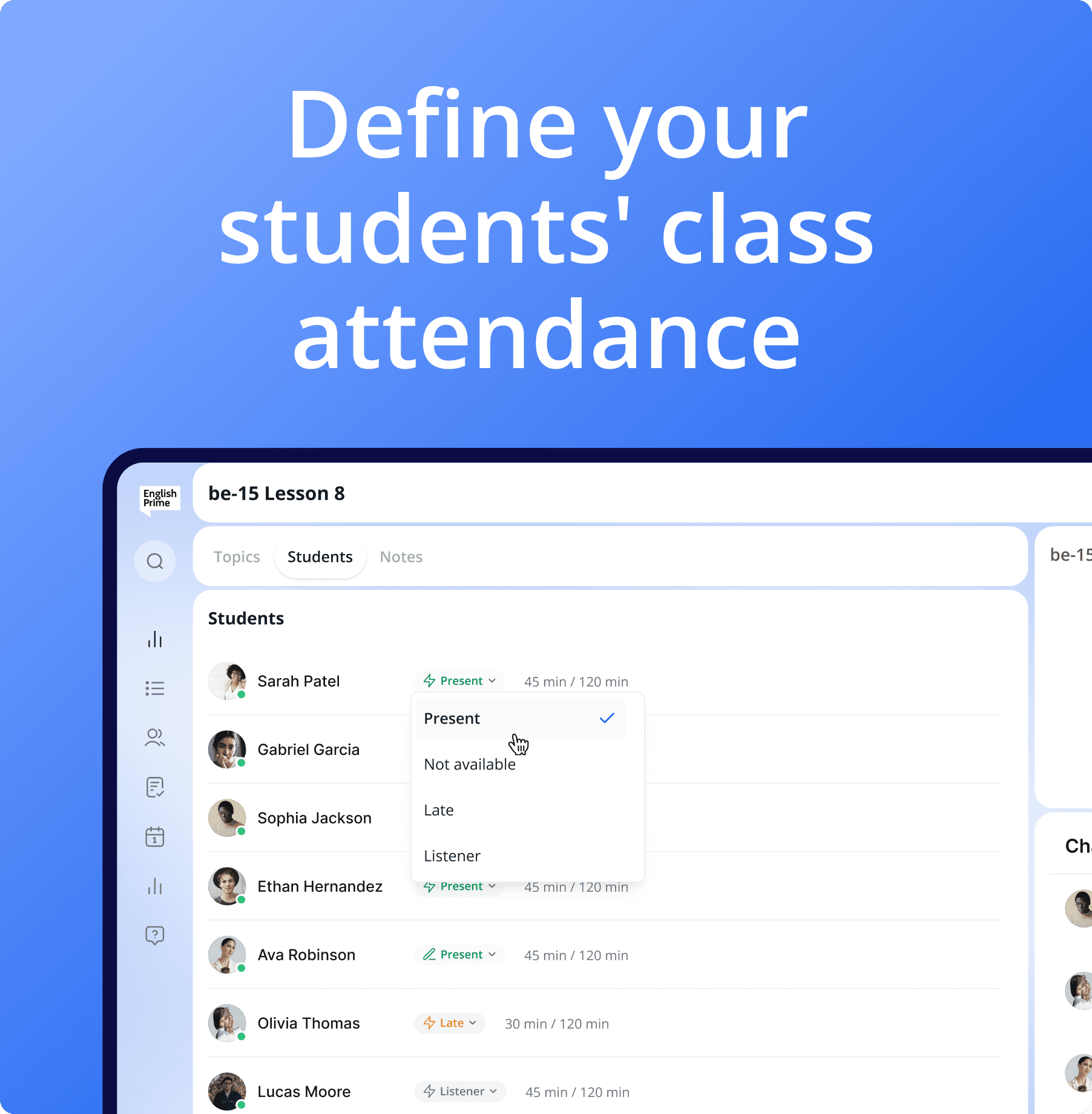
The teacher manages the course of the lesson: identifies the topics that have been covered, launches a presentation to explain the material in a convenient way, and after the lesson is over, records which topics have been mastered and which need to be carried over to the next lesson.
Conducting online lessons for groups of students
The teacher manages the course of the lesson: identifies the topics that have been covered, launches a presentation to explain the material in a convenient way, and after the lesson is over, records which topics have been mastered and which need to be carried over to the next lesson.
Conducting online lessons for groups of students
The teacher manages the course of the lesson: identifies the topics that have been covered, launches a presentation to explain the material in a convenient way, and after the lesson is over, records which topics have been mastered and which need to be carried over to the next lesson.
Conducting online lessons for groups of students
The teacher manages the course of the lesson: identifies the topics that have been covered, launches a presentation to explain the material in a convenient way, and after the lesson is over, records which topics have been mastered and which need to be carried over to the next lesson.
Conducting online lessons for groups of students
The teacher manages the course of the lesson: identifies the topics that have been covered, launches a presentation to explain the material in a convenient way, and after the lesson is over, records which topics have been mastered and which need to be carried over to the next lesson.
Solution
Solution
Solution
Solution
Solution
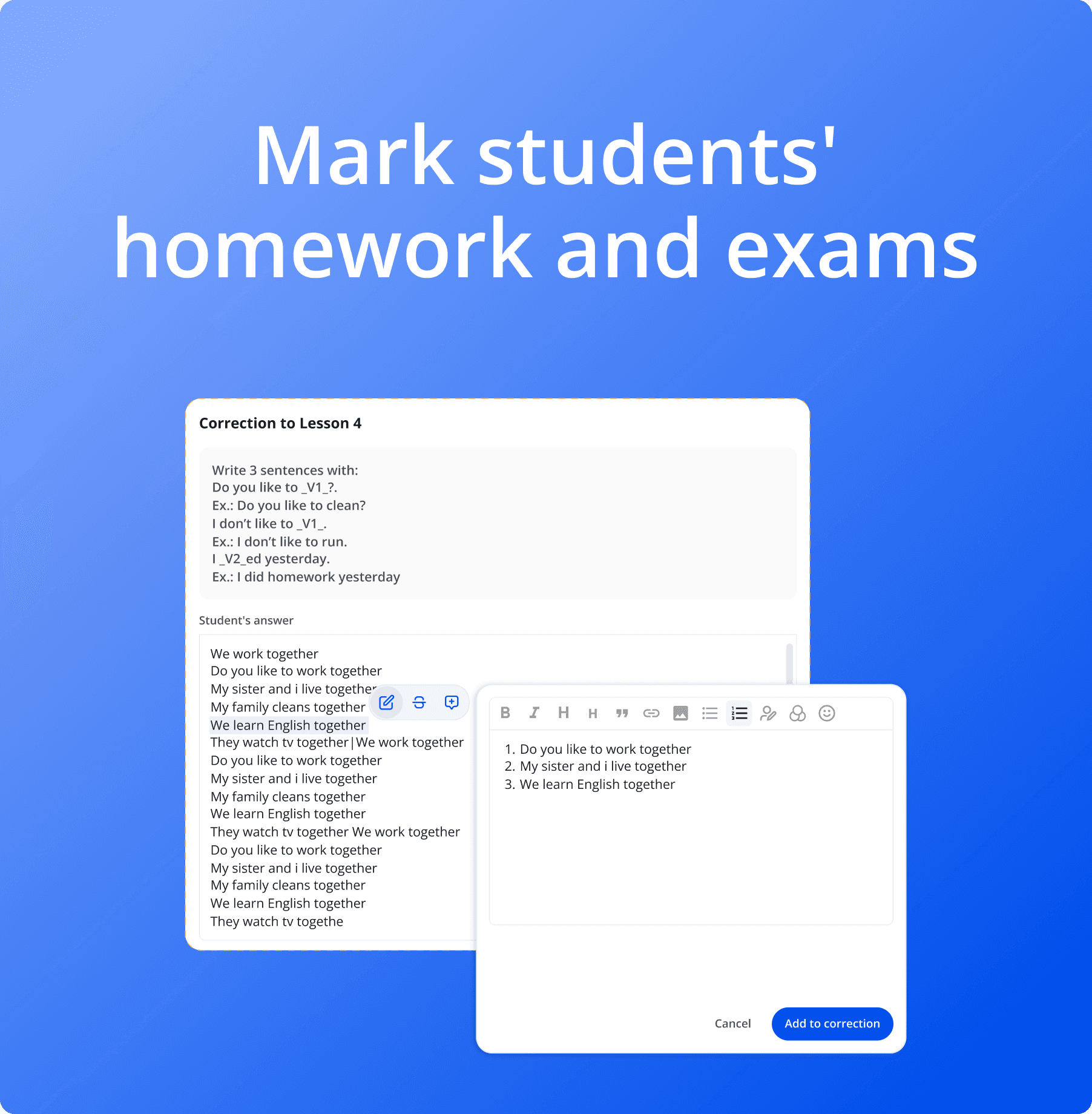
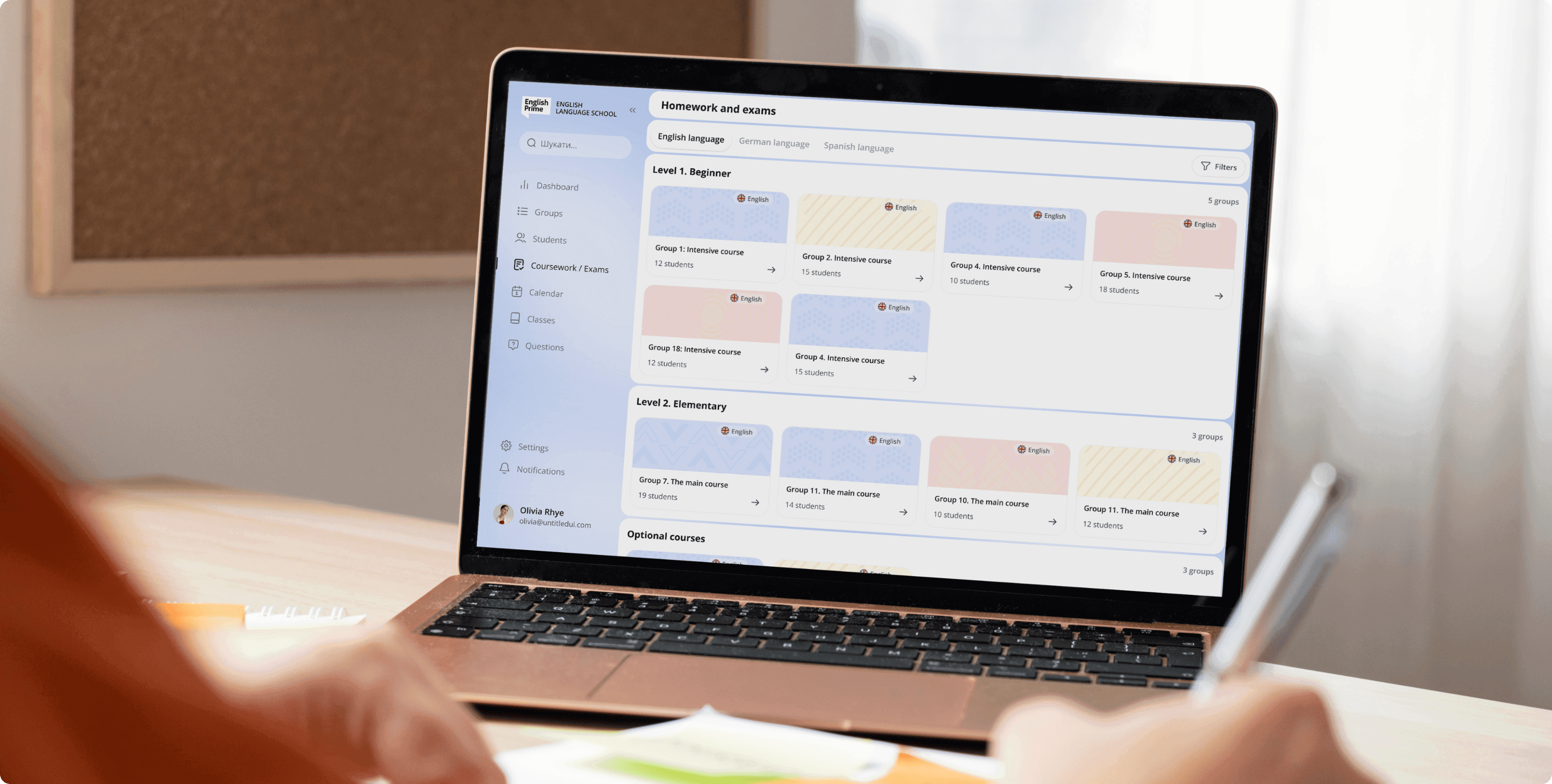
Manage groups and check exams
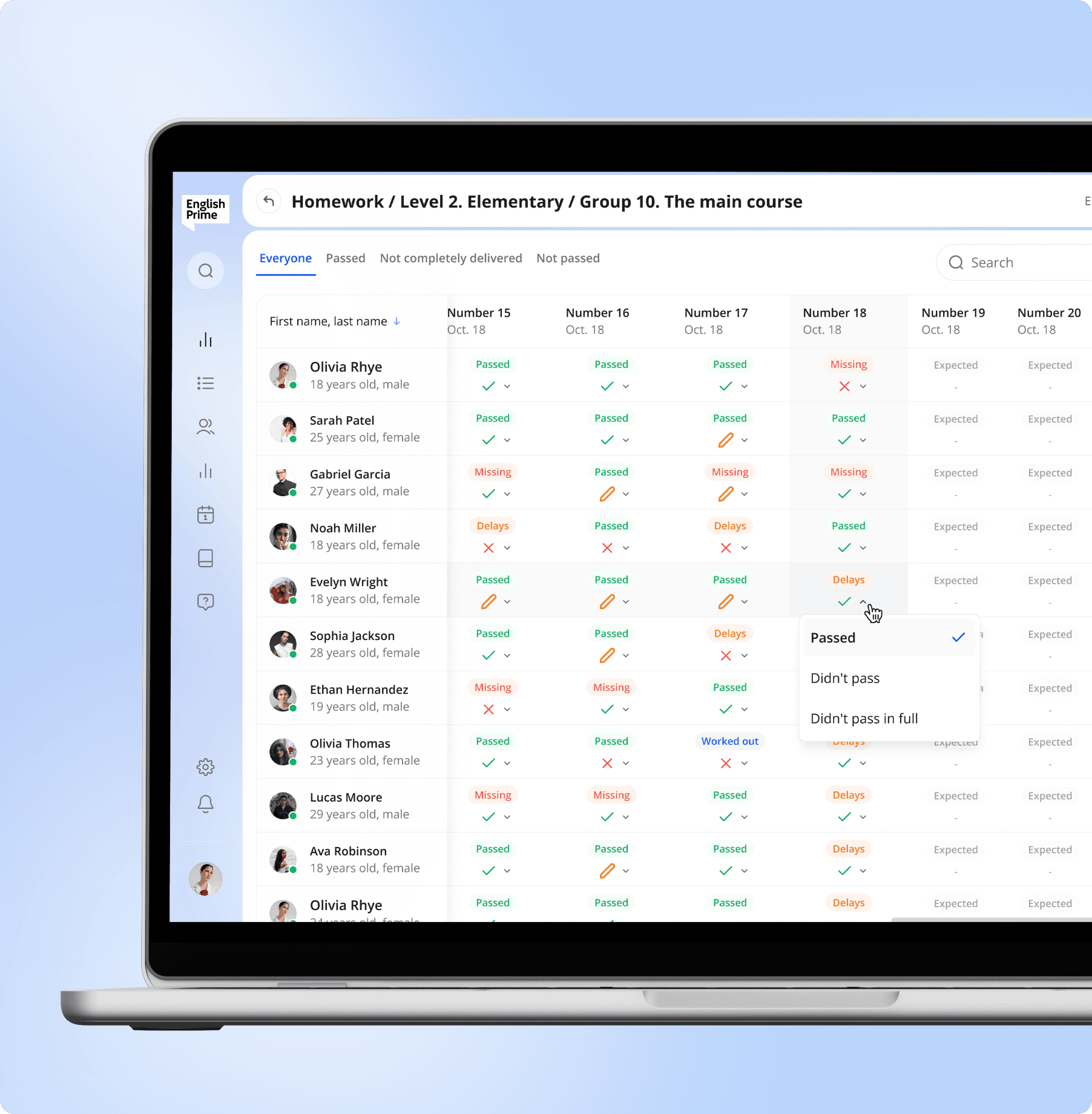
Teachers can filter the groups they work with by language, level, and type, which allows them to quickly navigate to the right group. Inside the group, the teacher sees a table with students and their performance on all homework and exams. When checking, the teacher can highlight individual words or sentences and choose one of three actions:
1. Add to correction - the student will have the opportunity to work on the error in the next homework assignment if additional practice is needed.
2. Cross out the text - to clearly indicate the error.
3. Leave a comment - to explain the reason for the error or give a recommendation.
Manage groups and check exams
Teachers can filter the groups they work with by language, level, and type, which allows them to quickly navigate to the right group. Inside the group, the teacher sees a table with students and their performance on all homework and exams. When checking, the teacher can highlight individual words or sentences and choose one of three actions:
1. Add to correction - the student will have the opportunity to work on the error in the next homework assignment if additional practice is needed.
2. Cross out the text - to clearly indicate the error.
3. Leave a comment - to explain the reason for the error or give a recommendation.
Manage groups and check exams
Teachers can filter the groups they work with by language, level, and type, which allows them to quickly navigate to the right group. Inside the group, the teacher sees a table with students and their performance on all homework and exams. When checking, the teacher can highlight individual words or sentences and choose one of three actions:
1. Add to correction - the student will have the opportunity to work on the error in the next homework assignment if additional practice is needed.
2. Cross out the text - to clearly indicate the error.
3. Leave a comment - to explain the reason for the error or give a recommendation.
Manage groups and check exams
Teachers can filter the groups they work with by language, level, and type, which allows them to quickly navigate to the right group. Inside the group, the teacher sees a table with students and their performance on all homework and exams. When checking, the teacher can highlight individual words or sentences and choose one of three actions:
1. Add to correction - the student will have the opportunity to work on the error in the next homework assignment if additional practice is needed.
2. Cross out the text - to clearly indicate the error.
3. Leave a comment - to explain the reason for the error or give a recommendation.
Manage groups and check exams
Teachers can filter the groups they work with by language, level, and type, which allows them to quickly navigate to the right group. Inside the group, the teacher sees a table with students and their performance on all homework and exams. When checking, the teacher can highlight individual words or sentences and choose one of three actions:
1. Add to correction - the student will have the opportunity to work on the error in the next homework assignment if additional practice is needed.
2. Cross out the text - to clearly indicate the error.
3. Leave a comment - to explain the reason for the error or give a recommendation.
Solution
Solution
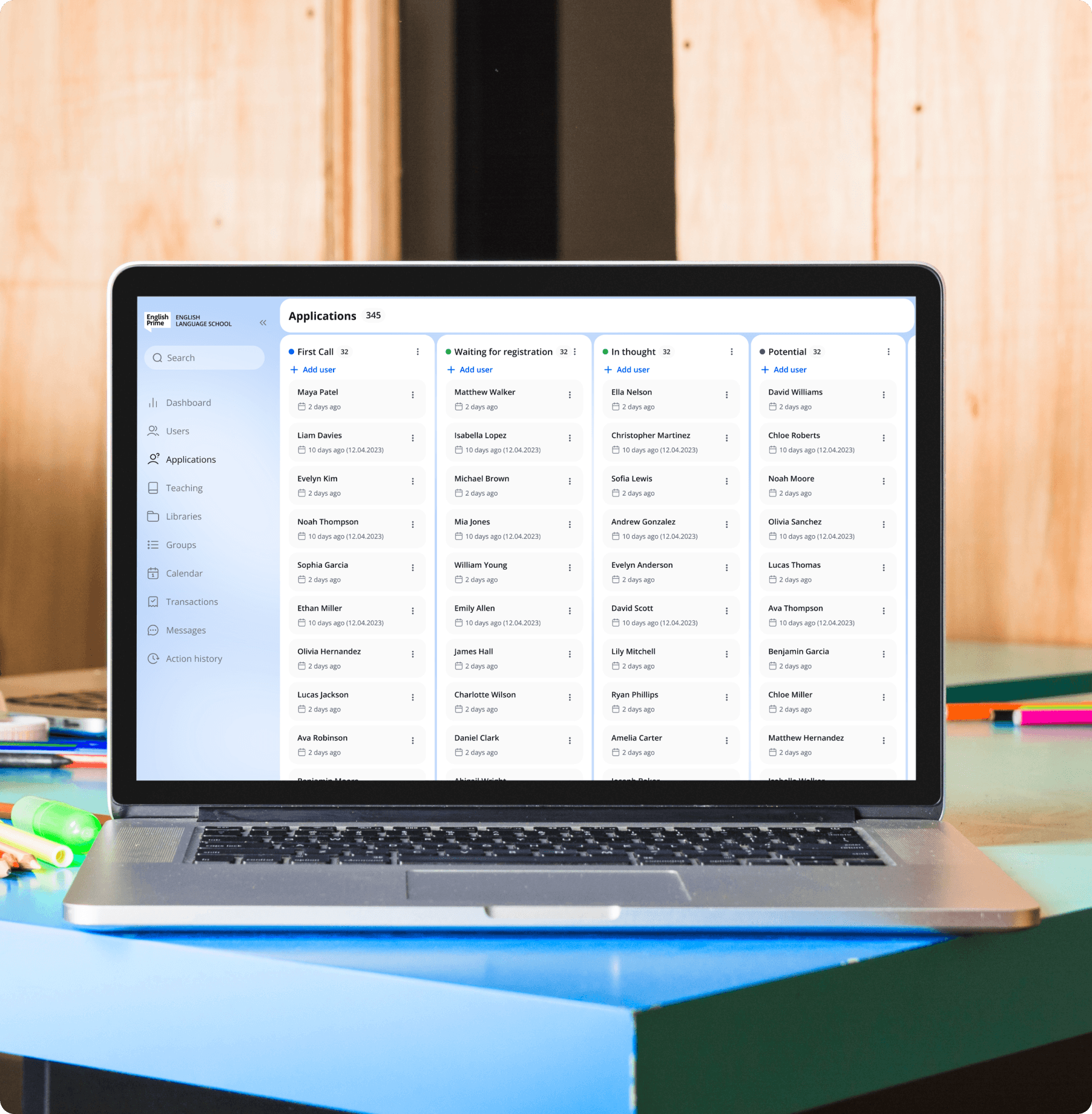
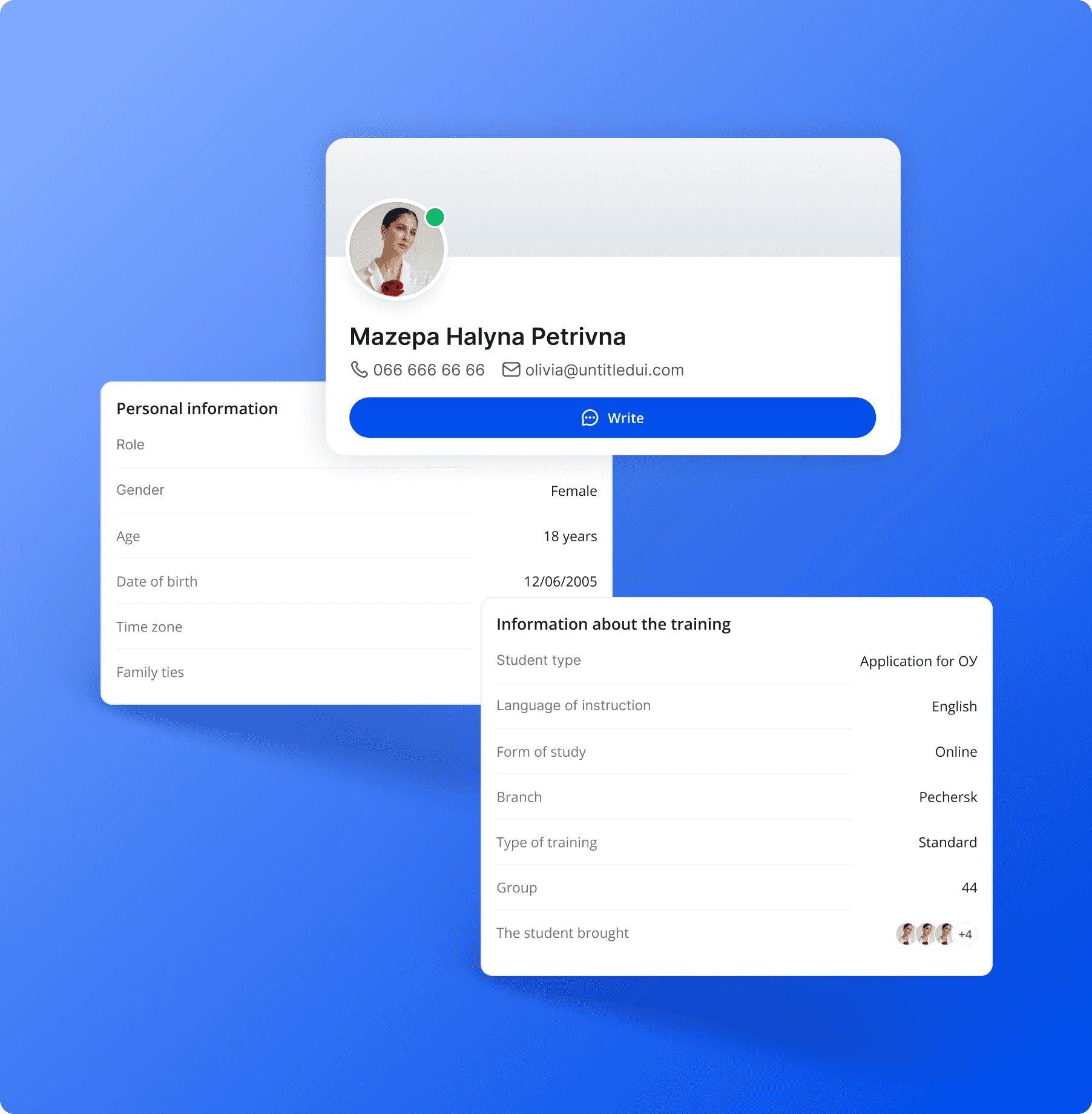
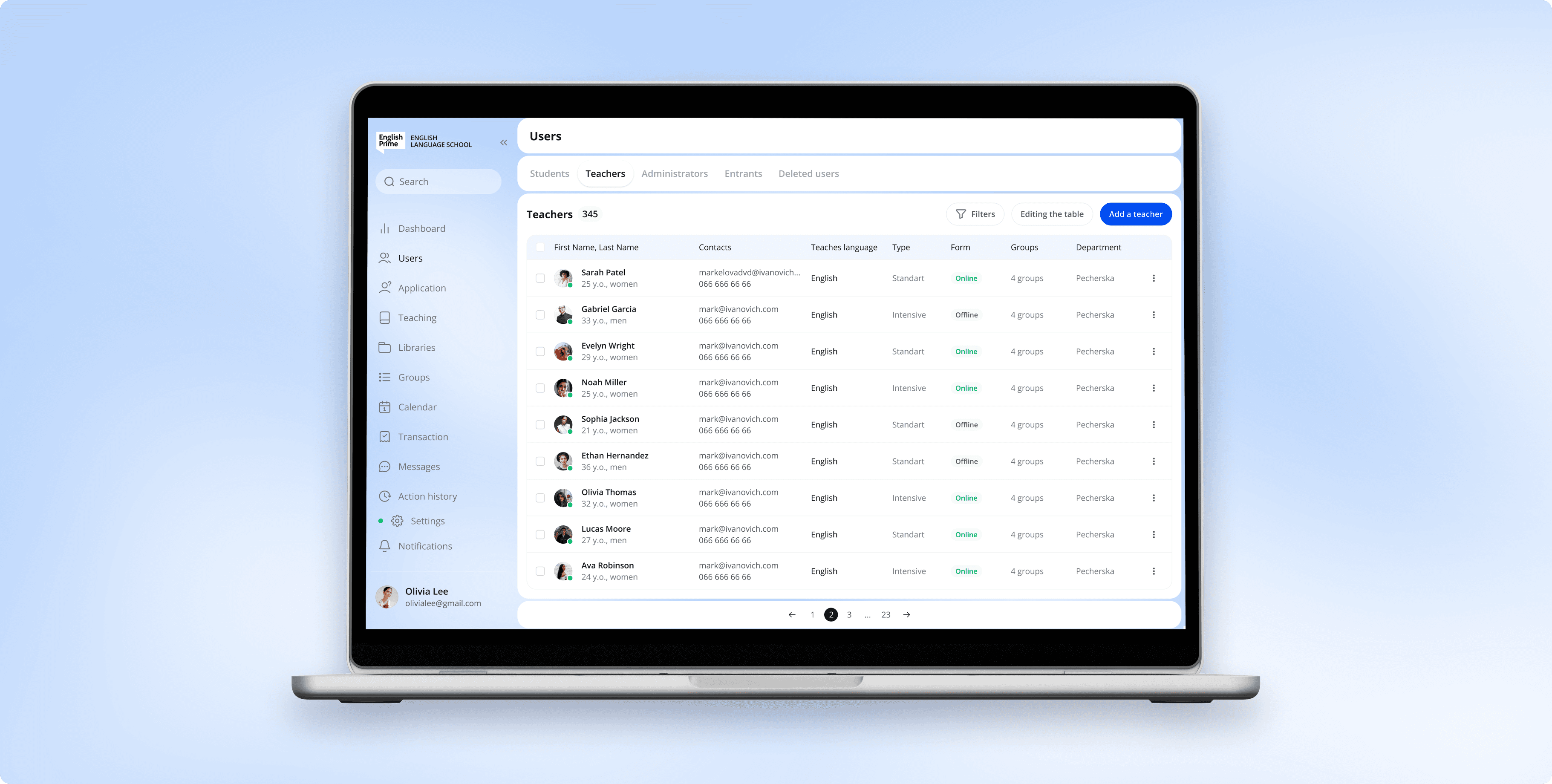
Managing English Prime users
English Prime administrators can add teachers, students, and managers, as well as potential students, to follow up with them as part of marketing activities.
For this purpose, a kanban board has been implemented, which displays users at different stages of interaction: from initial interest to waiting for registration for a course.
Managing English Prime users
English Prime administrators can add teachers, students, and managers, as well as potential students, to follow up with them as part of marketing activities.
For this purpose, a kanban board has been implemented, which displays users at different stages of interaction: from initial interest to waiting for registration for a course.
Managing English Prime users
English Prime administrators can add teachers, students, and managers, as well as potential students, to follow up with them as part of marketing activities.
For this purpose, a kanban board has been implemented, which displays users at different stages of interaction: from initial interest to waiting for registration for a course.
Solution
Solution
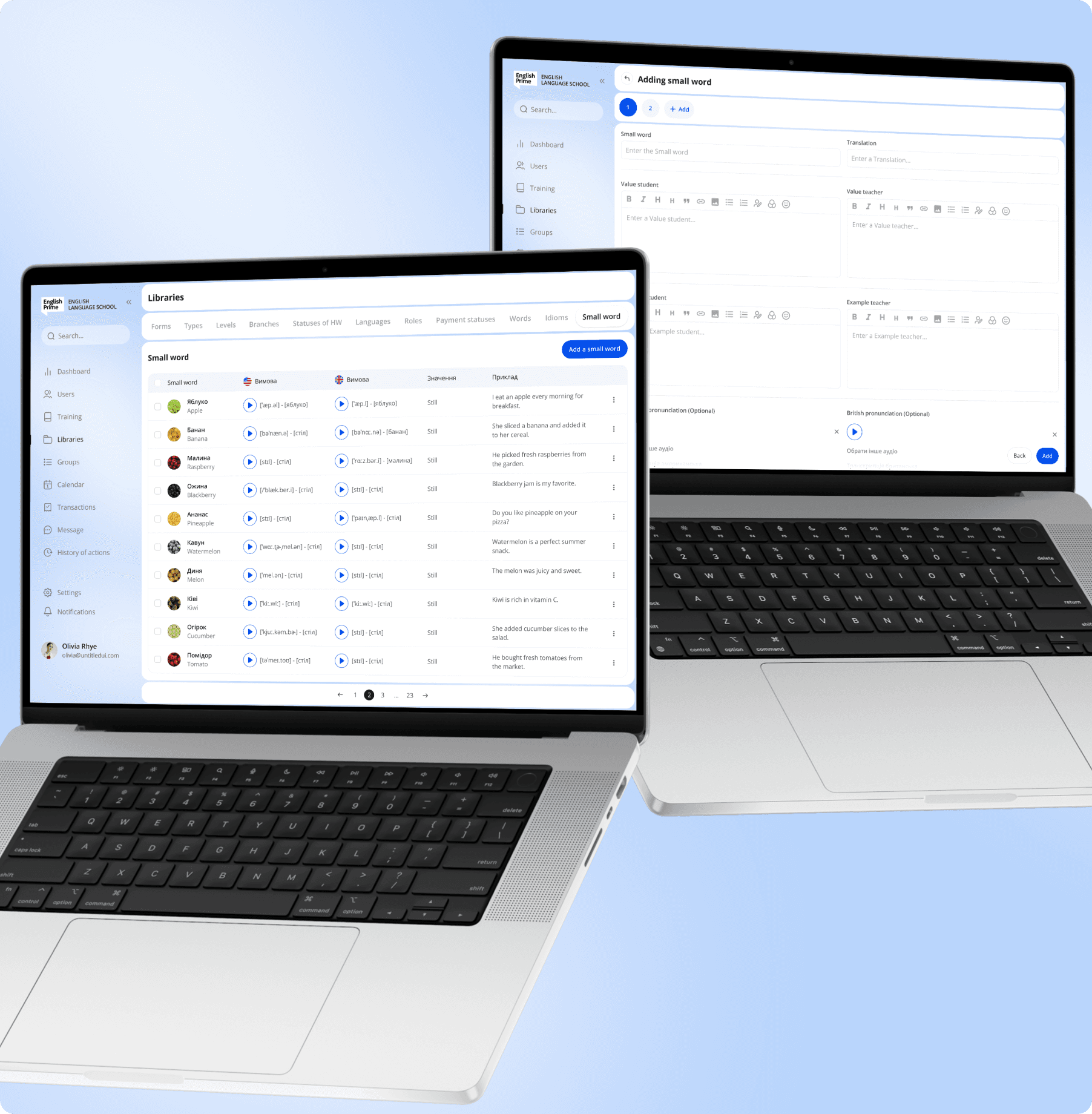
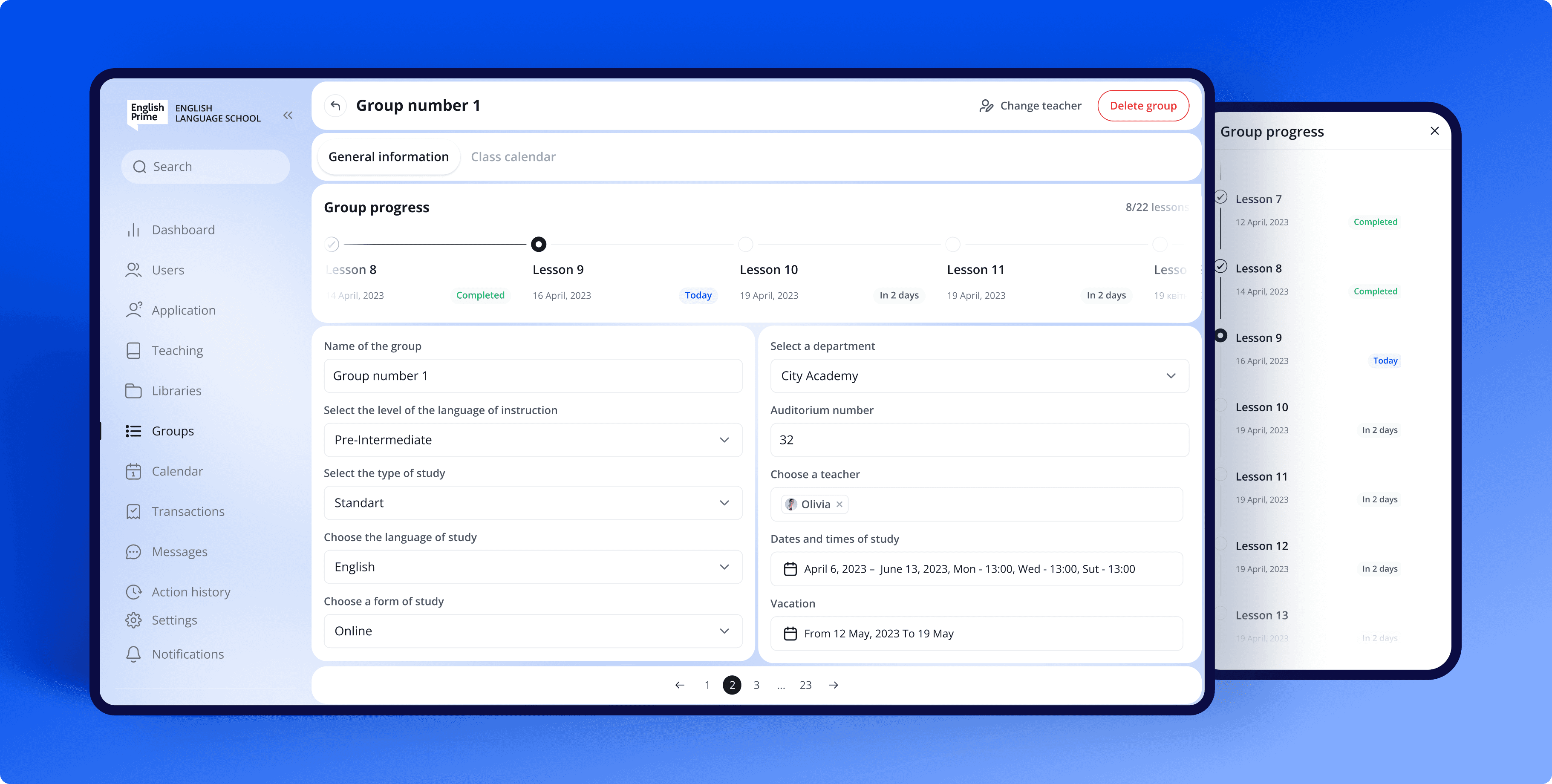
The logic of creating courses
A library was created to which you can add learning materials - words, videos, idioms, sentence patterns, etc... These materials can be used to create lessons, and lessons can be used to create courses that can be categorized by level (Beginner, Elementary, etc.). These courses can be purchased by students and studied in groups with other students.
The logic of creating courses
A library was created to which you can add learning materials - words, videos, idioms, sentence patterns, etc... These materials can be used to create lessons, and lessons can be used to create courses that can be categorized by level (Beginner, Elementary, etc.). These courses can be purchased by students and studied in groups with other students.
The logic of creating courses
A library was created to which you can add learning materials - words, videos, idioms, sentence patterns, etc... These materials can be used to create lessons, and lessons can be used to create courses that can be categorized by level (Beginner, Elementary, etc.). These courses can be purchased by students and studied in groups with other students.

Solution
Solution
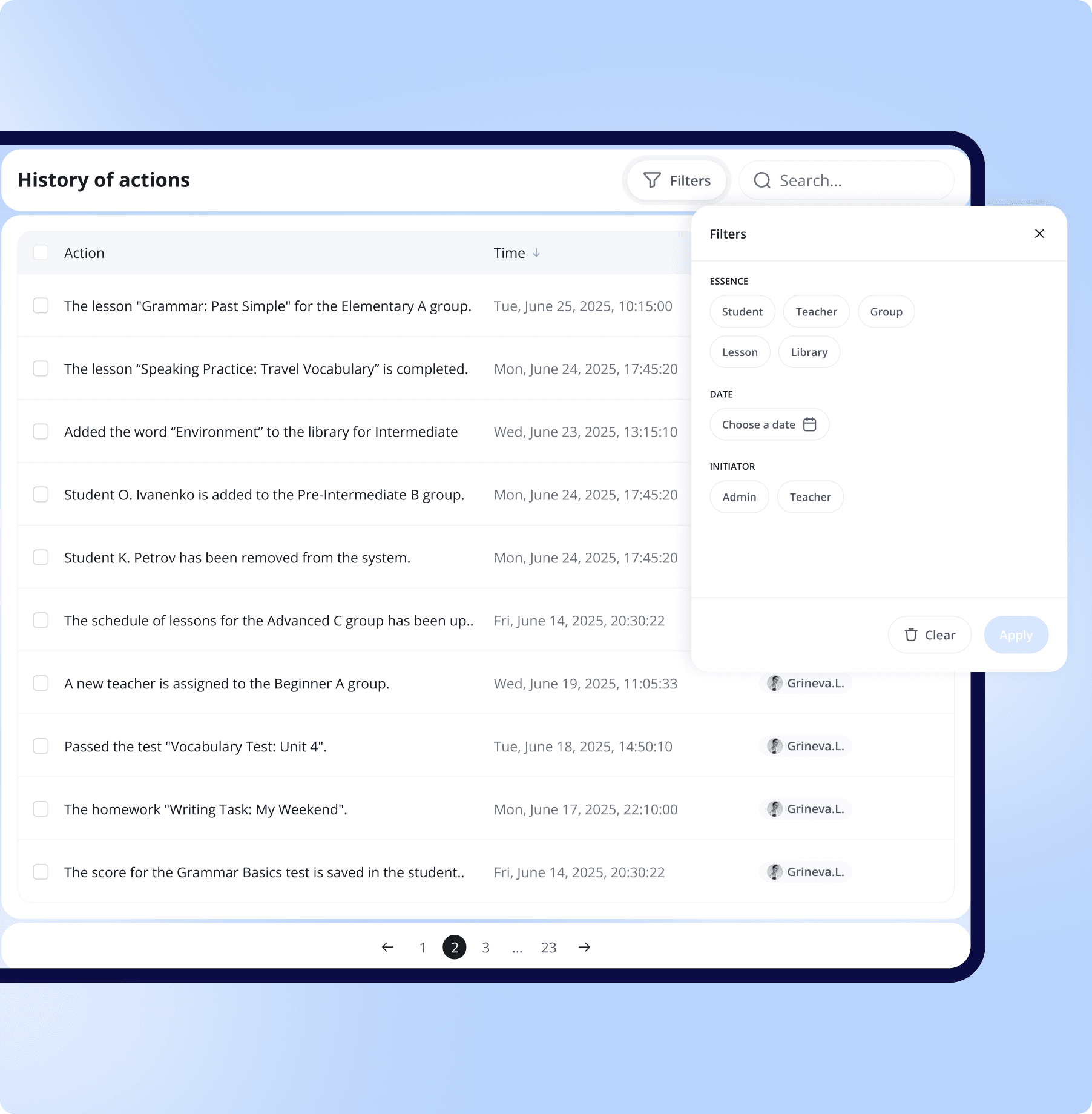
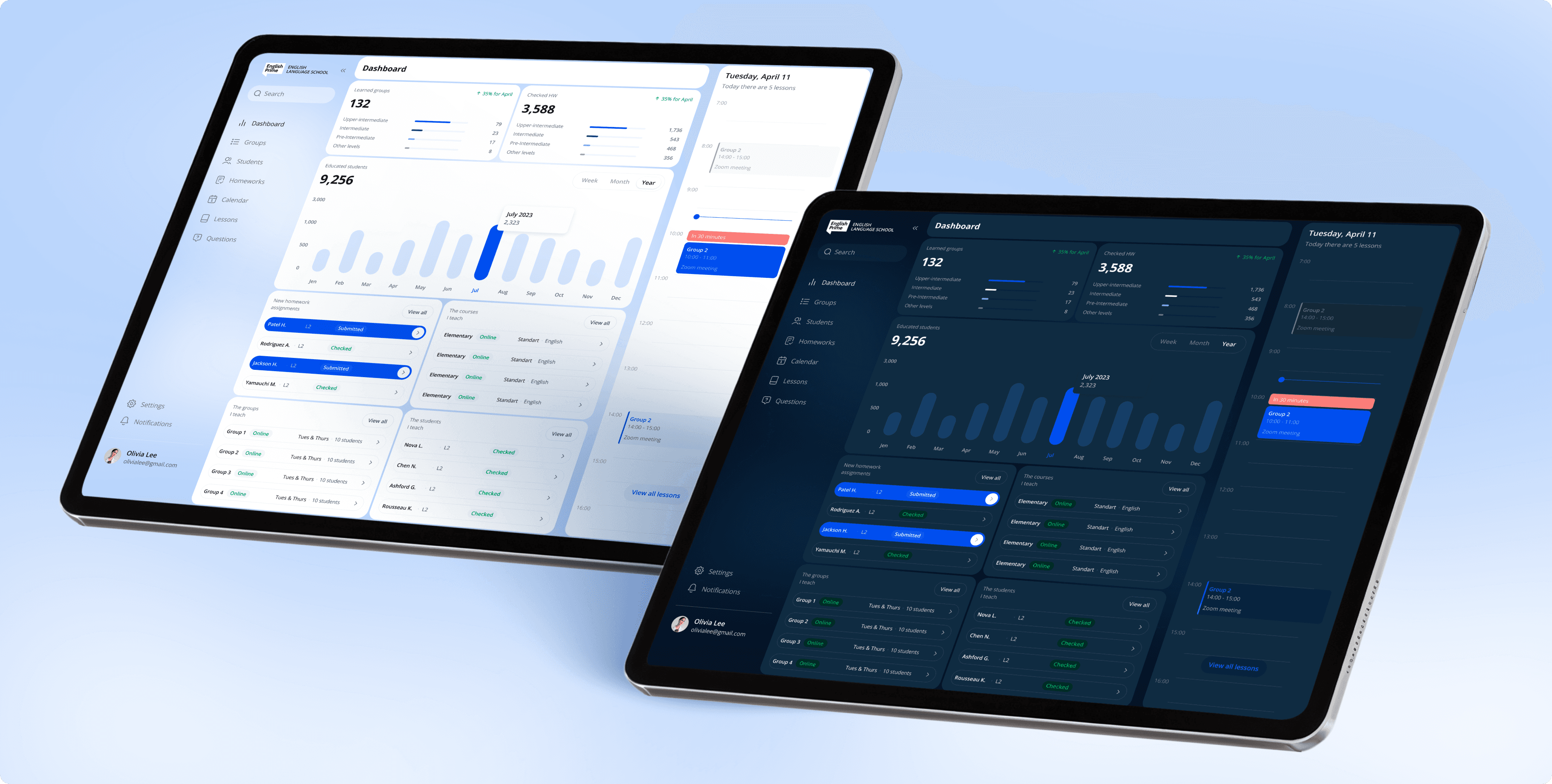
Control and analytics
With English Prime, you can track all the actions performed by a manager, recruiter, or teacher; all financial receipts to the company; and monitor statistics on the number of students, teachers, lessons, and more.
Control and analytics
With English Prime, you can track all the actions performed by a manager, recruiter, or teacher; all financial receipts to the company; and monitor statistics on the number of students, teachers, lessons, and more.
Control and analytics
With English Prime, you can track all the actions performed by a manager, recruiter, or teacher; all financial receipts to the company; and monitor statistics on the number of students, teachers, lessons, and more.
Step 1
Step 2
Step 3
Step 4
Step 1
Step 2
Step 3
Step 4
Step 1
Step 2
Step 3
Step 4
Step 1
Step 2
Step 3
Step 4
Step 1
Step 2
Step 3
Step 4

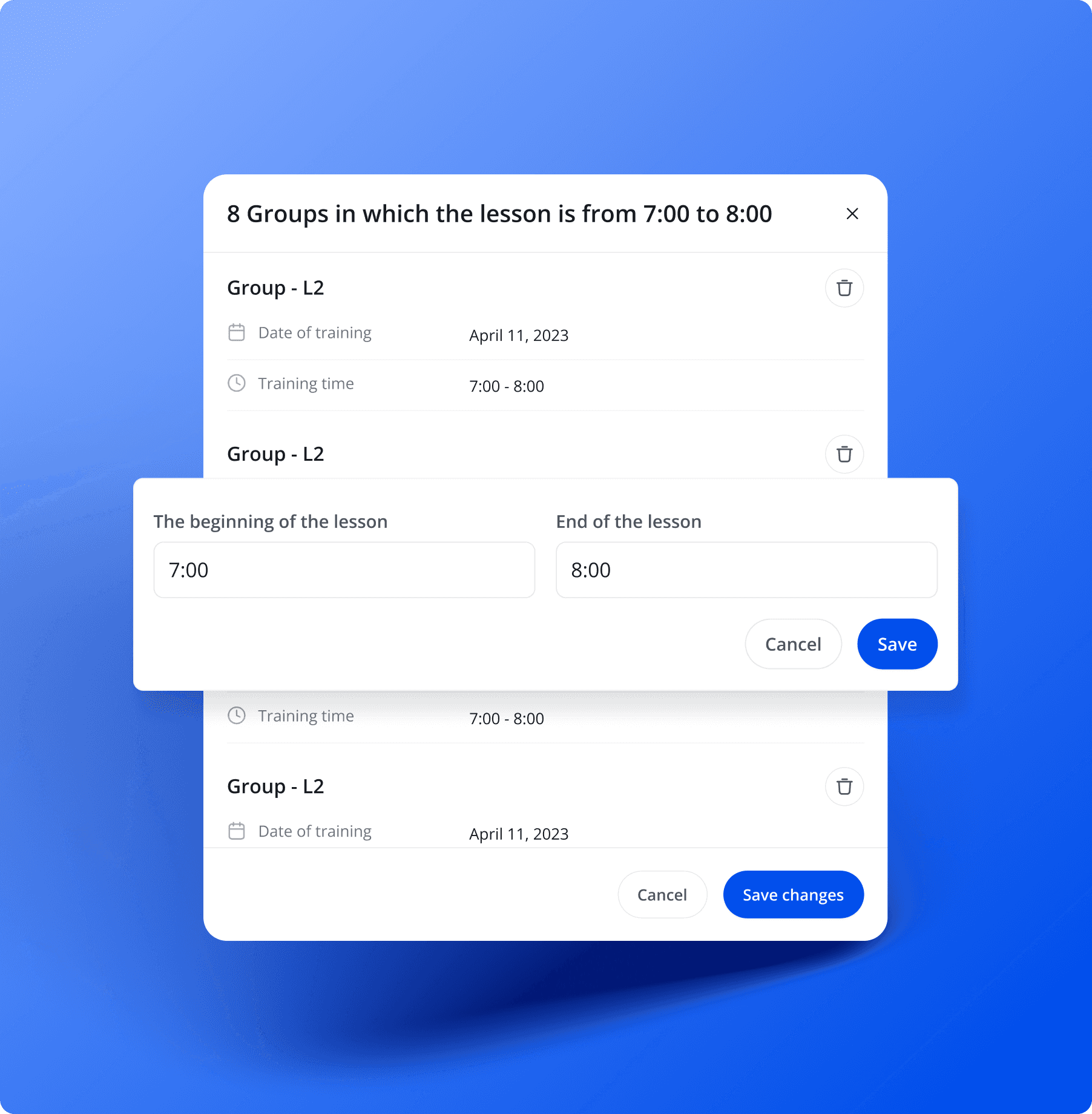
// Analysis
Defining Key Requirements and Functions
I started by analyzing the client's requirements and the core functionality they wanted to implement. This involved breaking down features, understanding user roles, and identifying key use cases. The analysis provided a clear foundation for structuring the interface around real user scenarios and business needs.
// Analysis
Defining Key Requirements and Functions
I started by analyzing the client's requirements and the core functionality they wanted to implement. This involved breaking down features, understanding user roles, and identifying key use cases. The analysis provided a clear foundation for structuring the interface around real user scenarios and business needs.
// Analysis
Defining Key Requirements and Functions
I started by analyzing the client's requirements and the core functionality they wanted to implement. This involved breaking down features, understanding user roles, and identifying key use cases. The analysis provided a clear foundation for structuring the interface around real user scenarios and business needs.
// Analysis
Defining Key Requirements and Functions
I started by analyzing the client's requirements and the core functionality they wanted to implement. This involved breaking down features, understanding user roles, and identifying key use cases. The analysis provided a clear foundation for structuring the interface around real user scenarios and business needs.
// Analysis
Defining Key Requirements and Functions
I started by analyzing the client's requirements and the core functionality they wanted to implement. This involved breaking down features, understanding user roles, and identifying key use cases. The analysis provided a clear foundation for structuring the interface around real user scenarios and business needs.
//
//
//
//
//
portfolio
portfolio
portfolio
portfolio
portfolio
I creating effective
digital business -
solutions
I creating effective
digital business -
solutions
I creating effective
digital business -
solutions
I creating effective
digital business -
solutions
I creating effective
digital business -
solutions
Umoja Labs
Umoja Labs
Umoja Labs
Umoja Labs
Umoja Labs
Web 3.0
( 2022 )
UI/UX / Branding
UI/UX / Branding
UI/UX / Branding
UI/UX / Branding
UI/UX / Branding

MoveMentors
MoveMentors
MoveMentors
MoveMentors
Sportstech
( 2022 )
Ux/Ui / Branding
Ux/Ui / Branding
Ux/Ui / Branding
Ux/Ui / Branding
SynFX Exchange
Web 3.0
UX/UI / Branding
Please tell me about your project
Please tell me about your project
Please tell me about your project
Please tell me about your project
Free consultation with an expert. Choose a convenient time or send message in Telegram or WhatsApp and I will contact you!
Free consultation with an expert. Choose a convenient time or send message in Telegram or WhatsApp and I will contact you!
Free consultation with an expert. Choose a convenient time or send message in Telegram or WhatsApp and I will contact you!
Free consultation with an expert. Choose a convenient time or send message in Telegram or WhatsApp and I will contact you!
Please tell me about your project
Free consultation with an expert. Choose a convenient time or send message in Telegram or WhatsApp and I will contact you!

//
get in touch
©2025 Copyright

//
get in touch
©2025 Copyright
//
get in touch
©2025 Copyright
//
get in touch
©2025 Copyright
//
get in touch
©2025 Copyright